Subscribers
Manage users who receive notifications about status updates.
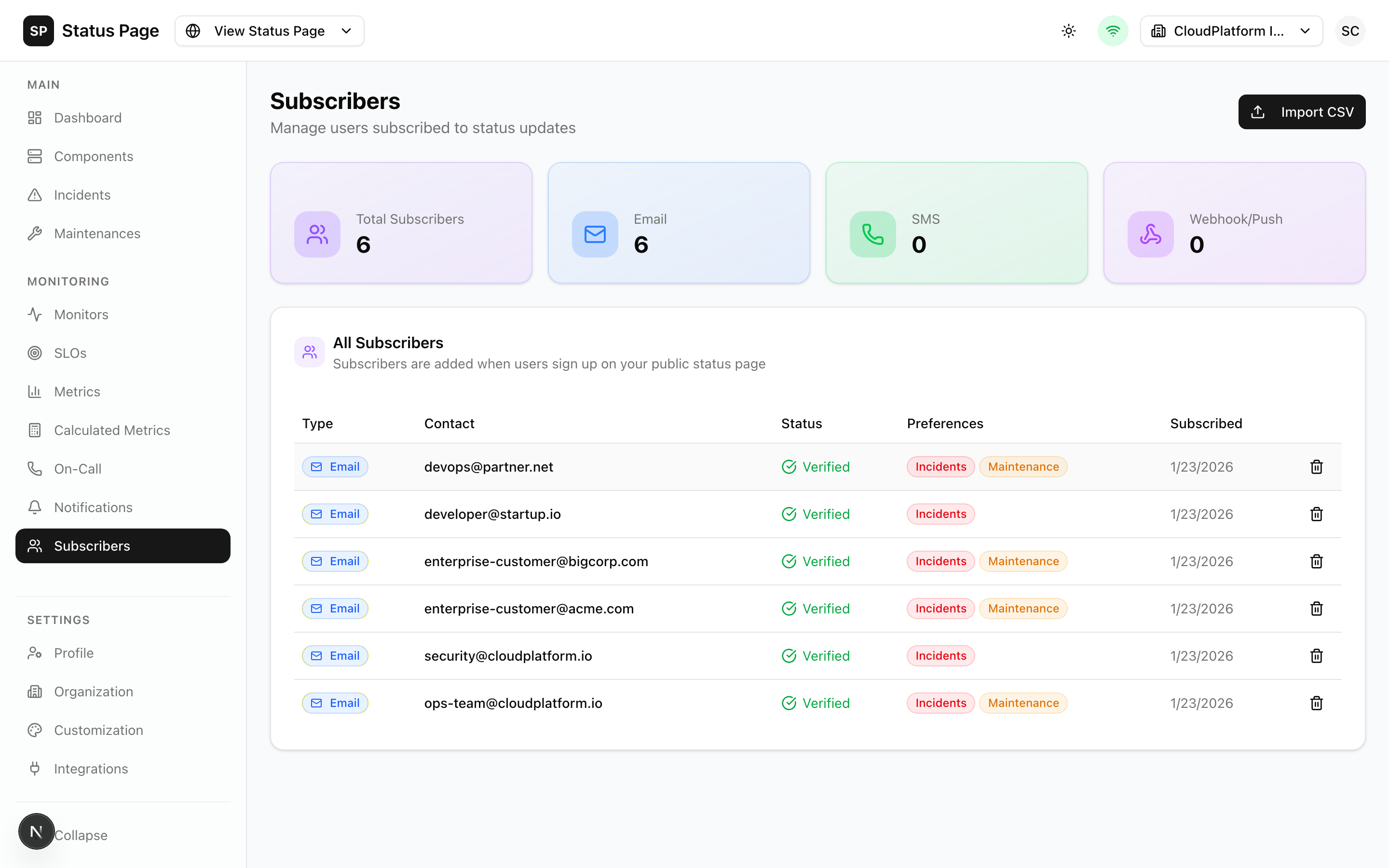
Overview
Subscribers are users who want to be notified about:
- New incidents
- Incident updates and resolutions
- Scheduled maintenances
- Component status changes
Subscription Channels
| Channel | Description |
|---|---|
| Email notifications | |
| SMS | Text message alerts |
| Webhook | HTTP POST to custom URL |
| RSS/Atom | Feed subscriptions (self-service) |
How Users Subscribe
Public Subscription Form
Users can subscribe from your status page:
- They click "Subscribe" on your status page
- Choose their notification method
- Enter contact information
- Select components to follow (optional)
- Confirm subscription
Admin-Created Subscriptions
Create subscriptions from the dashboard:
- Navigate to Dashboard > Subscribers
- Click "Add Subscriber"
- Configure:
| Field | Description |
|---|---|
| Type | Email, SMS, or Webhook |
| Contact | Email/phone/URL |
| Components | Specific components (or all) |
| Events | Which events to notify |
- Click "Create"
Email Subscribers
Creating
curl -X POST http://localhost:3000/api/v1/subscribers \
  -H "Authorization: Bearer sk_live_xxx" \
  -H "Content-Type: application/json" \
  -d '{
    "type": "email",
    "email": "user@example.com",
    "componentIds": [],
    "events": ["incident.created", "incident.resolved"]
  }'
Email Branding
Customize notification emails:
- Navigate to Settings > Email Branding
- Configure:
- Logo
- Colors
- Header/footer text
- Custom CSS
Email Preview
Test email appearance:
- Go to Settings > Email Branding
- Click "Preview"
- Select template type
- View rendered email
SMS Subscribers
SMS requires Twilio configuration. See Notifications.
Creating
curl -X POST http://localhost:3000/api/v1/subscribers \
  -H "Authorization: Bearer sk_live_xxx" \
  -H "Content-Type: application/json" \
  -d '{
    "type": "sms",
    "phone": "+1234567890",
    "componentIds": []
  }'
SMS Format
SMS messages are concise:
[ReliaPulse] Major Incident: API is down.
View: https://status.example.com/incidents/123
Webhook Subscribers
Send notifications to custom endpoints:
Creating
curl -X POST http://localhost:3000/api/v1/subscribers \
  -H "Authorization: Bearer sk_live_xxx" \
  -H "Content-Type: application/json" \
  -d '{
    "type": "webhook",
    "webhookUrl": "https://example.com/webhook",
    "webhookSecret": "optional-secret"
  }'
Webhook Payload
{
  "event": "incident.created",
  "timestamp": "2026-01-22T10:30:00Z",
  "incident": {
    "id": "inc_123",
    "title": "API Response Delays",
    "status": "investigating",
    "impact": "major",
    "components": ["API"]
  }
}
Webhook Security
If webhookSecret is set:
- Signature included in
X-Signature-256header - Calculated as HMAC-SHA256 of payload
Verify in your endpoint:
const crypto = require('crypto');
const signature = crypto
  .createHmac('sha256', secret)
  .update(body)
  .digest('hex');

if (signature !== request.headers['x-signature-256']) {
  throw new Error('Invalid signature');
}
CSV Import
Bulk import subscribers:
Preparing the CSV
type,email,phone,componentIds
email,user1@example.com,,
email,user2@example.com,,comp-1
sms,,+1234567890,
sms,,+0987654321,comp-1;comp-2
Importing
- Navigate to Dashboard > Subscribers
- Click "Import"
- Upload CSV file
- Review preview
- Confirm import
Import Options
| Option | Description |
|---|---|
| Skip Duplicates | Ignore existing emails/phones |
| Update Duplicates | Update component preferences |
RSS/Atom/JSON Feeds
Self-service feeds require no subscription:
| Format | URL |
|---|---|
| RSS | /api/v1/public/status/{slug}/feed?format=rss |
| Atom | /api/v1/public/status/{slug}/feed?format=atom |
| JSON | /api/v1/public/status/{slug}/feed?format=json |
Users can add these to their feed readers.
Managing Subscribers
Viewing Subscribers
- Navigate to Dashboard > Subscribers
- Filter by type or search
- View subscriber details
Editing Preferences
- Click on a subscriber
- Modify:
- Component subscriptions
- Event preferences
- Contact information
- Save changes
Unsubscribing
User self-service:
- Click unsubscribe link in email
- Text STOP for SMS
Admin removal:
- Find the subscriber
- Click "Delete"
- Confirm
Component Subscriptions
Subscribers can follow specific components:
All Components
Leave component selection empty to receive all notifications.
Specific Components
Select specific components:
- Only notified about those components
- New components not automatically added
Component Groups
Subscribe to a parent component to receive notifications for all children.
Event Preferences
Control which events trigger notifications:
| Event | Description |
|---|---|
incident.created | New incident |
incident.updated | Status/content changed |
incident.resolved | Incident resolved |
maintenance.scheduled | Maintenance planned |
maintenance.started | Maintenance begins |
maintenance.completed | Maintenance ends |
API Access
List Subscribers
curl http://localhost:3000/api/v1/subscribers \
  -H "Authorization: Bearer sk_live_xxx"
Create Subscriber
curl -X POST http://localhost:3000/api/v1/subscribers \
  -H "Authorization: Bearer sk_live_xxx" \
  -H "Content-Type: application/json" \
  -d '{
    "type": "email",
    "email": "user@example.com"
  }'
Delete Subscriber
curl -X DELETE http://localhost:3000/api/v1/subscribers/{id} \
  -H "Authorization: Bearer sk_live_xxx"
Import Subscribers
curl -X POST http://localhost:3000/api/v1/subscribers/import \
  -H "Authorization: Bearer sk_live_xxx" \
  -H "Content-Type: multipart/form-data" \
  -F "file=@subscribers.csv"
Best Practices
Privacy
- Collect only necessary information
- Provide easy unsubscribe
- Comply with email regulations (CAN-SPAM, GDPR)
Communication
- Don't over-notify
- Keep messages relevant
- Include essential information only
Maintenance
- Clean up bounced emails
- Remove inactive subscribers
- Review webhook endpoints
Related Documentation
- Notifications - Channel configuration
- Incidents - What triggers notifications
- Status Pages - Subscription forms